Month: January 2026

manual alarm station

Manual alarm stations are crucial, designated systems for manually triggering fire alarms, often called manual call points (MCPs). These devices are strategically placed for quick access.

They empower individuals to immediately signal a fire emergency, enhancing overall building safety and facilitating swift evacuation procedures when needed.

What is a Manual Alarm Station?

A manual alarm station, also known as a manual call point (MCP) or fire alarm call point, is a device enabling individuals to manually initiate a fire alarm; Unlike automatic detection systems, it requires human activation upon discovering a fire.

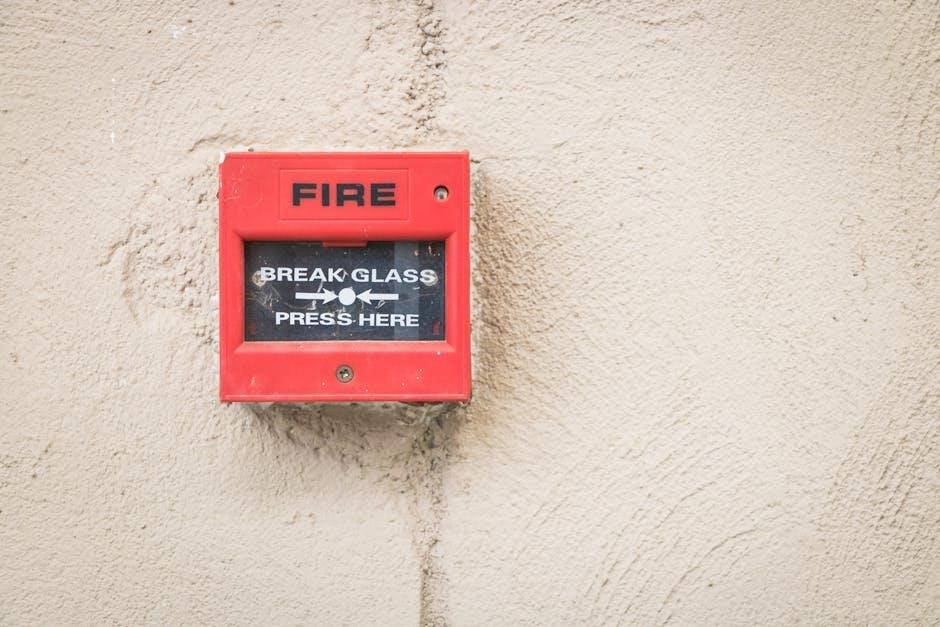
These stations are strategically positioned throughout a building, ensuring accessibility during emergencies. Typically, they feature a break glass mechanism or require a key to operate, immediately signaling an alarm to the fire alarm control panel.

Their primary function is to provide a reliable, direct method for occupants to alert others to a fire, supplementing automatic systems and enhancing overall fire safety protocols. They are a vital component of a comprehensive fire protection strategy.

The Role of Manual Call Points (MCPs) in Fire Safety
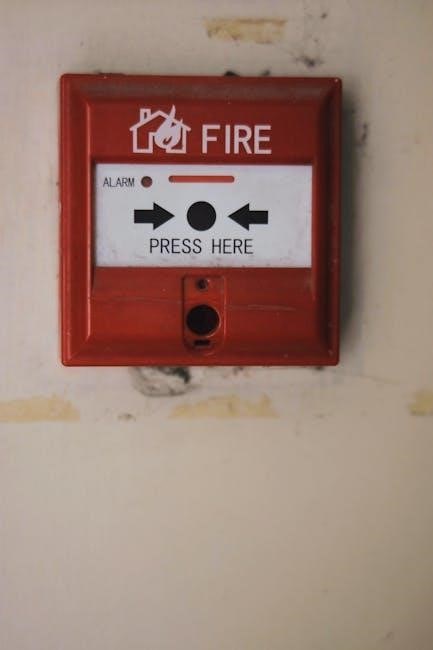
Manual Call Points (MCPs) play a critical role in a comprehensive fire safety system, acting as a vital component alongside automatic detection. They empower building occupants to proactively initiate an alarm upon discovering a fire, providing an immediate alert even before smoke or flames are widespread.

Strategically located MCPs ensure rapid activation, facilitating swift evacuation and minimizing potential harm. They are particularly important in areas where automatic detection might be less effective or delayed, offering a direct and reliable means of signaling an emergency.

MCPs complement automatic systems, creating a robust fire safety network, and are essential for protecting lives and property. Their accessibility and ease of use are paramount for effective emergency response.

Types of Manual Alarm Stations

Manual alarm stations come in diverse forms, including break glass call points, key-operated versions, and systems integrated with waterflow switches for activation.

Break Glass Call Points

Break glass call points are a widely recognized type of manual alarm station, employing a frangible element – typically glass – protected by a cover. To activate the alarm, one must break the glass, exposing a button or lever.

These are designed for immediate, unambiguous activation in emergency situations. However, standards like EN 54-11 (Annex A) specify that simply moving the protective cover doesn’t constitute activation; the glass must be broken to trigger the alarm.

The HM-MCP-GLASS-AP is an example of an addressable break glass call point designed for integration with Morley IASs fire alarm control panels, prioritizing installation efficiency and compliance with current standards.

They are a common and reliable method for manual fire alarm initiation.

Key Operated Call Points

Key operated call points represent a more secure type of manual alarm station, requiring a specific key to activate the alarm. This feature is particularly valuable in environments where accidental or malicious activations are a concern, such as sensitive facilities or areas prone to vandalism.

Unlike break glass units, these don’t rely on physical destruction for activation. Instead, inserting the designated key and operating the mechanism initiates the alarm signal.

This controlled activation method minimizes false alarms while still providing a readily accessible means for authorized personnel to signal a fire emergency. They offer an added layer of security and prevent unintentional triggering.

Key operation ensures deliberate and authorized alarm activation.

Waterflow Switches as Manual Activation

Waterflow switches function as a unique form of manual alarm activation, primarily integrated within sprinkler systems. When the sprinkler system activates due to heat from a fire, the subsequent water flow triggers the switch, automatically initiating the building’s fire alarm system.

While not a direct manual pull station, this system provides an automated response to fire, effectively acting as a manual activation consequence. It’s a passive system, relying on the sprinkler’s activation to signal an alarm.

This integration offers a rapid and reliable method for alerting occupants and emergency services, complementing traditional manual call points. It’s a crucial component of comprehensive fire protection strategies, ensuring swift notification upon water discharge.

Waterflow switches provide automated alarm signaling linked to sprinkler activation.
Standards and Regulations

Fire alarm systems, including manual call points, are governed by strict standards like BS 5839-1, EN 54-11, and DIN VDE 0833-2, ensuring reliability and safety.

BS 5839-1: British Standards for Fire Detection

BS 5839-1 is the cornerstone of fire detection and alarm systems in the UK, providing comprehensive guidance on design, installation, commissioning, and maintenance. Regarding manual call points, this standard dictates that no person should be required to travel more than 25 meters to reach one on any storey.

This accessibility requirement is paramount for ensuring swift alarm activation in emergency situations. The standard also specifies considerations for the placement of MCPs, emphasizing visibility and ease of access for all potential users. Compliance with BS 5839-1 is not just a legal obligation but a fundamental aspect of fire safety management, guaranteeing a robust and reliable system.

Regular inspections and testing, as outlined within the standard, are vital for maintaining the operational effectiveness of manual alarm stations and the overall fire alarm system.

EN 54-11: European Standards for Manual Call Points

EN 54-11 defines the requirements for manual call points across Europe, ensuring a consistent level of reliability and performance. This standard meticulously details the construction, testing, and functionality of these critical fire safety devices. A key aspect covered by EN 54-11 concerns the activation mechanism; simply moving a protective cover isn’t sufficient to trigger the alarm.

The standard mandates that the frangible element – typically glass – must be broken to reliably activate the system. This prevents accidental activations and ensures a deliberate action initiates the alarm. Compliance with EN 54-11 demonstrates a commitment to quality and safety, providing confidence in the system’s ability to respond effectively during a fire emergency.

Rigorous testing protocols are integral to this standard.

DIN VDE 0833-2: German Standards for Installation

DIN VDE 0833-2 provides specific guidelines for the installation of manual call points within Germany, focusing on ensuring optimal functionality and accessibility. This standard dictates that these devices should be mounted at a clearly visible location, maintaining a consistent height of 1.4 meters, with a tolerance of plus or minus 0.2 meters, or plus or minus 0.4 meters;

Adhering to these height specifications is crucial for ease of use by all occupants, regardless of physical ability. The standard emphasizes the importance of referencing the complete DIN VDE 0833-2 document for comprehensive installation information. Proper installation, as defined by this standard, is paramount for the reliable operation of the fire alarm system and the safety of building occupants.

Detailed information is available within the standard.

Installation and Placement

Strategic placement of manual alarm stations is vital, ensuring accessibility from all building points, as dictated by standards like BS 5839-1. Visibility and ease of access are key.

Optimal Mounting Height (1.4m ± 0.6m)

Maintaining a consistent mounting height for manual call points (MCPs) is paramount for usability and compliance with safety regulations. The generally accepted standard, as referenced in DIN VDE 0833-2, specifies an optimal height of 1.4 meters (approximately 4.6 feet) with a tolerance of plus or minus 0.6 meters.

This range ensures that the MCP is readily accessible to the majority of building occupants, regardless of their stature. Deviations from this height can hinder quick activation during an emergency. Consistent height also aids in rapid identification of the call point location, particularly in stressful situations.

Adhering to this standard contributes significantly to a building’s overall fire safety strategy, promoting efficient and effective emergency response.

Strategic Locations for Accessibility

Strategic placement of manual call points (MCPs) is vital for ensuring swift fire alarm activation. According to British Standards (BS 5839-1), no occupant should have to travel an excessive distance to reach an MCP on any storey of a building.

Key locations include near all exits, on escape routes, and adjacent to stairwells. Accessibility must be prioritized; obstructions like furniture or displays should never block access. Consideration should be given to individuals with disabilities, ensuring MCPs are reachable from wheelchair height where feasible.

Properly positioned MCPs empower occupants to quickly initiate an alarm, maximizing safety and facilitating efficient evacuation procedures during a fire emergency.

Ensuring Visibility and Ease of Access

Visibility is paramount when it comes to manual call points (MCPs). They must be readily identifiable, even in low-light conditions or during periods of stress. Clear signage, utilizing universally recognized symbols, is essential to guide occupants.

MCPs should never be concealed behind obstructions or blended into the surrounding décor. A contrasting color scheme can enhance visibility. Furthermore, ease of access is crucial; the activation mechanism must be operable with minimal effort.

Regular inspections should verify that MCPs remain unobstructed and clearly visible, ensuring that anyone can quickly and effectively initiate a fire alarm when necessary, contributing to overall building safety.

Operational Requirements

Manual call point operation involves pressing the button to activate the alarm, immediately confirming the fire situation, and ensuring proper installation for reliable functionality.

Activating the Alarm: Pressing the Button

Activating a manual alarm station is a straightforward, yet critical, process designed for rapid response in fire emergencies. Typically, this involves firmly depressing the button or breaking the frangible element – as seen in break glass call points – to initiate the alarm signal.

Upon activation, the system immediately transmits a signal to the fire alarm control panel, triggering audible and visual alarms throughout the building. It’s essential to understand that simply moving a protective cover, without breaking the element, doesn’t activate the call point, adhering to EN 54-11 standards.

This direct manual intervention bypasses automatic detection systems, allowing anyone discovering a fire to promptly alert others, even if smoke or flames haven’t yet been detected by sensors. This immediate action can be life-saving.

Confirming the Fire Situation

Following alarm activation from a manual call point, confirming the actual fire situation is paramount, despite the urgency. While immediate evacuation is often necessary, briefly assessing the source of the alarm helps prevent unnecessary disruptions and ensures appropriate emergency response.

This doesn’t require extensive investigation, but a quick visual check for smoke or flames, or identifying the source of the activation, is advisable if safe to do so. Accurate information relayed to emergency services significantly improves their effectiveness.

Remember, false alarms can occur, and a confirmed fire allows for a focused and efficient response, minimizing potential damage and ensuring the safety of all occupants. Prioritize safety and follow established emergency protocols.

Proper Installation Procedures

Correct installation of manual call points (MCPs) is vital for reliable fire safety. Adherence to standards like DIN VDE 0833-2 is crucial, ensuring compliance and optimal performance. Mounting height should be precisely 1.4m ± 0.6m, guaranteeing accessibility for all occupants.

Wiring must be secure and conform to electrical codes, preventing malfunctions. The MCP should be firmly fixed to the wall, resisting accidental damage or displacement. Regular checks during installation verify proper functionality and responsiveness.
Qualified technicians should perform installations, documenting all work for future maintenance and inspection. Following these procedures guarantees the MCP will operate effectively when needed, protecting lives and property.

Maintenance and Testing

Regular inspection and testing of manual call points are essential for ensuring functionality. Scheduled checks, detailed record-keeping, and documented testing procedures guarantee reliability.

Regular Inspection Schedules

Establishing consistent inspection schedules is paramount for maintaining the reliability of manual alarm stations. BS 5839-1, the British Standard for fire detection, guides these intervals, typically recommending monthly visual inspections.

These inspections should verify the unobstructed visibility of the call point, ensuring the break glass or operating mechanism isn’t damaged or compromised. A more detailed functional test, involving activation of the alarm, should occur every six months.

Detailed records of all inspections and tests must be meticulously maintained, documenting dates, findings, and any corrective actions taken. This documentation provides a clear audit trail and demonstrates compliance with relevant safety standards, ultimately safeguarding building occupants.

Testing Procedures to Ensure Functionality

Functional testing of manual alarm stations is vital to confirm operational readiness. This involves simulating a fire scenario by activating the call point – breaking the glass or using a key, depending on the type.

Upon activation, verify the immediate transmission of an alarm signal to the fire alarm control panel and subsequent activation of audible and visual alarms throughout the building. EN 54-11 outlines specific testing requirements, including checking the responsiveness and reset functionality.

Document all test results, noting any delays or failures. Address any identified issues promptly, ensuring the system is fully functional before returning the call point to its normal state. Regular testing guarantees reliable performance during an actual emergency.

Record Keeping and Documentation

Comprehensive record-keeping is essential for maintaining a reliable fire safety system. Detailed logs should document all inspections, testing, and maintenance performed on manual alarm stations.

Each entry must include the date, time, technician’s name, specific call point tested or serviced, and a clear description of the actions taken and results obtained. Any faults or repairs should be meticulously recorded, along with the corrective measures implemented.

Maintain readily accessible documentation, including system schematics, manufacturer’s manuals, and testing reports. This ensures compliance with BS 5839-1 and facilitates efficient troubleshooting and future maintenance efforts, demonstrating due diligence.

nuwave infrared oven instruction manual

NuWave Infrared Oven Instruction Manual: A Comprehensive Guide

Welcome! This manual details various NuWave oven models – Pro-Smart, Bravo XL, Primo Grill, and Elite. It covers setup, operation, and maintenance for optimal cooking performance.

Understanding Your NuWave Oven

The NuWave Infrared Oven utilizes innovative infrared technology to cook food rapidly and efficiently. Unlike conventional ovens that heat air, NuWave directly heats the food itself, resulting in faster cooking times and enhanced moisture retention. This unique process ensures food is cooked thoroughly while maintaining its natural flavors and textures.

Several models exist, including the Pro-Smart, Bravo XL, Primo Grill, and Elite, each offering varying features and capacities. The core principle remains consistent across all models: utilizing infrared heat for superior cooking. Understanding this fundamental difference is key to maximizing your NuWave oven’s potential.

The oven’s design focuses on versatility, allowing you to cook a wide range of dishes – from frozen foods to fresh ingredients – with minimal preheating. It’s designed to mimic various cooking methods, such as baking, roasting, grilling, and even air frying, all within a single appliance. Familiarizing yourself with these capabilities will unlock a world of culinary possibilities. Remember to consult the specific model instructions for detailed operation.

Model Variations & Identification

NuWave offers a diverse range of infrared ovens to suit various cooking needs. Key models include the Pro-Smart Oven, Bravo XL Oven, Bravo Toaster Oven, Primo Grill Oven, Elite Oven, Pro Plus Oven, and Pro Plus 2 Oven. Identifying your specific model is crucial for accessing the correct instruction manual and support resources.

The Pro-Smart and Bravo XL are popular choices, known for their advanced features and larger capacities. The Primo Grill offers specialized grilling capabilities, while the Elite provides a more compact and affordable option. Newer models, like the Sous Vide Combi Steam Oven and Bravo XL Pro Smart Oven, incorporate cutting-edge technology.

Model numbers, such as 20356 (Pro Digital Controlled Infrared Tabletop Oven), 20101 (Infrared Oven Mini), and 20334 (Pro Infrared Oven), are typically located on a label affixed to the oven’s base or rear panel. Referencing this number when seeking assistance or replacement parts ensures compatibility. Distinguishing between models like 20322 Pro (Amazon) and 20326 (Bigkitchen) is important for sourcing correct information.

Unboxing and Initial Setup

Carefully unpack your NuWave Infrared Oven, ensuring all components are present. Typically, this includes the oven base, cooking dome, extender ring, roasting rack, and potentially other accessories depending on the model; Inspect for any visible damage incurred during shipping; report any issues immediately to the retailer.

Before first use, thoroughly clean the oven’s interior and all accessories with warm, soapy water. Rinse and dry completely. Place the oven on a stable, heat-resistant surface with adequate ventilation. Avoid positioning it near flammable materials or water sources.

Familiarize yourself with the power cord and ensure it’s securely connected to a grounded electrical outlet. Some models may require an initial ‘burn-off’ period to eliminate any manufacturing residue. This usually involves running the oven empty at a specific temperature for a designated time – consult your model-specific instructions for details. Proper initial setup ensures optimal performance and longevity.

Key Components and Their Functions

The oven base houses the heating elements and control panel, providing the core cooking power. The cooking dome, typically made of stainless steel, focuses infrared heat onto the food, ensuring even cooking and browning. An extender ring increases the oven’s capacity, accommodating larger dishes.

The roasting rack elevates food, allowing for 360-degree heat circulation and preventing it from simmering in its own juices. Some models feature a drip pan to collect fats and liquids, simplifying cleanup. The temperature probe (if included) monitors internal food temperature for precise cooking.

Infrared technology cooks food from the inside out, preserving moisture and nutrients. The heating elements generate intense, direct heat, reducing cooking times significantly. Understanding each component’s role is crucial for maximizing the NuWave oven’s capabilities and achieving consistently delicious results. Proper component usage ensures safe and efficient operation.

Control Panel Overview

The digital display clearly shows cooking time and temperature settings; Power buttons initiate and terminate the cooking process. Temperature control buttons allow precise adjustment of cooking heat, crucial for different recipes. Time control buttons set the desired cooking duration, often in minute increments.

Mode selection buttons access pre-programmed settings for various food types – roast, bake, broil, and more. A start/pause button begins or temporarily halts the cooking cycle. Some models include a high/low setting for adjusting cooking intensity. The clear/reset button reverts the panel to its initial state.

Understanding the control panel is vital for operating your NuWave oven effectively. Familiarize yourself with each button’s function before use. Refer to the pre-programmed settings guide for optimal results. Incorrect settings can affect cooking outcomes, so careful attention is recommended. The intuitive design ensures ease of use for all cooking levels.

Cooking Modes Explained

Roast mode utilizes consistent, moderate heat, ideal for larger cuts of meat, poultry, and vegetables, ensuring even cooking throughout. Bake mode provides gentle, all-around heat, perfect for cakes, cookies, and casseroles, mimicking traditional oven baking. Broil mode delivers intense, direct heat from above, quickly searing and browning food surfaces – excellent for finishing dishes.

Grill mode (available on Primo models) simulates outdoor grilling, imparting smoky flavors to meats and vegetables. Some NuWave ovens feature a combination mode, blending convection and infrared heat for faster, more efficient cooking. Air Fry mode (on newer models) circulates hot air for crispy, oil-free results, similar to deep frying.

Selecting the correct mode is crucial for optimal results; Experiment with different modes to discover what works best for your favorite recipes. Refer to the included recipe guide for suggested modes and cooking times. Understanding each mode’s characteristics unlocks the full potential of your NuWave oven.

Temperature and Time Settings

Temperature control on your NuWave oven is typically digital, allowing precise adjustments from 100°F to 400°F (or higher on some models). Use the “+” and “-” buttons to increase or decrease the temperature in increments of 5 or 10 degrees. Time settings are equally adjustable, ranging from 1 minute to several hours, depending on the cooking mode and recipe requirements.

Pre-programmed settings offer convenience, but manual control provides flexibility. When manually setting temperature and time, always consult a reliable recipe as a starting point. Monitor food closely, especially during initial use, to determine optimal settings for your preferences.

Remember that infrared cooking often requires shorter cooking times and lower temperatures compared to conventional ovens. Overcooking can lead to dryness, so err on the side of caution. The control panel displays both the set temperature and remaining cooking time, allowing for easy monitoring and adjustments throughout the cooking process.

Using Pre-Programmed Settings

Pre-programmed settings simplify cooking by automatically configuring temperature and time for common foods. Your NuWave oven likely includes presets for items like chicken, steak, pizza, potatoes, and frozen foods. To utilize these, simply select the desired food type from the control panel. The oven will then initiate the pre-set cooking cycle.

However, remember that these settings are general guidelines. Food weight, thickness, and initial temperature can affect cooking results. For optimal outcomes, it’s often beneficial to adjust the time slightly, especially when cooking larger or smaller portions.

The manual may provide specific recommendations for adjusting pre-programmed settings based on food characteristics. Don’t hesitate to experiment to find what works best for your preferences. While convenient, pre-programmed settings may not always deliver perfect results without some user customization. Always ensure food reaches a safe internal temperature.

Manual Cooking: A Step-by-Step Guide

Manual cooking offers complete control over the cooking process. First, place your food within the appropriate accessory – a roasting rack, baking pan, or directly on the cooking surface. Next, use the control panel to set your desired temperature. NuWave ovens allow precise temperature adjustments, crucial for achieving optimal results.

Following temperature selection, input the cooking time. Refer to recipes or general cooking guidelines for recommended times, adjusting based on food weight and thickness. Press the ‘Start’ button to initiate the cooking cycle. Monitor the food’s progress periodically, especially during initial attempts with new recipes.

You can pause the oven at any time to check food or make adjustments. Remember to use oven mitts when handling hot accessories. For best results, utilize a food thermometer to ensure food reaches a safe internal temperature. Manual cooking requires practice, but unlocks the full potential of your NuWave oven;

Accessories and Their Uses

NuWave ovens boast a versatile range of accessories, expanding cooking capabilities. The roasting rack is ideal for meats, promoting even cooking and crispy skin by allowing fat to drip away. Baking pans are essential for cakes, cookies, and casseroles, ensuring consistent heat distribution. The extension ring increases oven capacity, accommodating larger dishes or whole chickens.

A drip pan collects grease and juices, simplifying cleanup and preventing smoking. Specialized accessories like the sear plate deliver intense heat for searing steaks and browning foods. Some models include a grill rack for achieving grill marks and flavors. The steaming rack facilitates healthy steaming of vegetables and fish.

Understanding each accessory’s function unlocks the oven’s full potential; Always refer to recipe instructions for recommended accessories. Proper accessory usage ensures optimal cooking results and extends the lifespan of your NuWave oven. Explore the possibilities!

Cooking with Different Accessories

Utilizing accessories dramatically alters cooking outcomes. With the extension ring installed, roasting a whole chicken becomes feasible, ensuring even cooking throughout. Employ the roasting rack for succulent, crispy-skinned poultry and meats; the elevated position allows for all-around heat circulation. For baking, the baking pan delivers consistent results for cakes, breads, and casseroles.

The drip pan is crucial when cooking fatty foods, preventing smoke and simplifying cleanup. Achieve perfectly seared steaks using the sear plate, capitalizing on intense, direct heat. For healthier options, the steaming rack preserves nutrients and flavors in vegetables and fish. The grill rack imparts those desirable grill marks on burgers and vegetables.

Experimentation is key! Remember to adjust cooking times based on accessory usage. Always consult recipes for specific recommendations. Proper accessory selection maximizes the NuWave oven’s versatility and delivers exceptional culinary results.

Cleaning and Maintenance

Regular cleaning ensures optimal performance and longevity of your NuWave oven. Always unplug the unit and allow it to cool completely before cleaning. The cooking well and accessories are dishwasher safe, offering convenient cleaning. For stubborn residue, use a non-abrasive cleaner and a soft cloth; avoid harsh chemicals or scouring pads which can damage the surface.

The exterior can be wiped down with a damp cloth. Pay attention to the heating element, gently removing any food particles with a soft brush. Never immerse the oven base in water. Periodically inspect the power cord for damage and replace if necessary. Proper ventilation is crucial; ensure vents are clear of obstructions.

Preventative maintenance includes wiping up spills immediately and avoiding overheating; Following these simple steps will keep your NuWave oven functioning efficiently for years to come, delivering consistently delicious results.

Troubleshooting Common Issues

Oven not heating? Ensure it’s properly plugged in and the power outlet is functioning. Check the timer settings – it may not be activated. Food cooking unevenly? Rotate the food during cooking, or ensure it’s spread evenly across the cooking surface. Consider using the appropriate accessory for the food type.

Error messages? Refer to the full instruction manual for specific code definitions. Smoke during operation? This could indicate excessive grease or food particles; clean the oven thoroughly. If the unit still smokes, discontinue use and contact customer support.

Difficulty with pre-programmed settings? Double-check the food weight and type match the setting’s requirements. For persistent issues, consult the NuWave website or contact their support team for assistance. Remember to always prioritize safety and avoid attempting repairs yourself.

Safety Precautions

Always operate the NuWave Infrared Oven on a stable, heat-resistant surface, away from flammable materials. Never immerse the oven base, power cord, or plug in water or other liquids. Ensure the oven is unplugged before cleaning or performing maintenance. Avoid touching hot surfaces; use oven mitts or tongs when handling hot accessories or food.

Do not operate the oven if the power cord or plug is damaged. Keep the oven out of reach of children. Never use abrasive cleaners or scouring pads, as they can damage the non-stick surface. Ensure proper ventilation during operation to prevent overheating.

Exercise caution when using metal cookware, as it may become very hot; Always allow the oven to cool completely before storing. If the oven malfunctions, discontinue use and contact NuWave customer support for assistance. Prioritize safety to prevent burns or electrical hazards.

Recipes and Cooking Times (General)

The NuWave oven excels at quickly cooking various foods. For frozen chicken, a general guideline is 30-40 minutes at 375°F (190°C), flipping halfway through. Steaks (1-inch thick) typically require 15-20 minutes at 400°F (200°C) for medium-rare. Vegetables like broccoli and carrots roast beautifully in 10-15 minutes at 350°F (175°C).

Pizza, even frozen, can be ready in under 10 minutes using the pre-programmed setting or manual control. Baked potatoes take approximately 45-60 minutes at 400°F (200°C). Remember these are estimates; adjust cooking times based on food thickness and desired doneness. Experiment with the oven’s capabilities!

For best results, utilize the included cooking guide or explore online resources for specific recipes tailored to NuWave ovens. The infrared technology cooks food rapidly, so frequent checking is recommended. Enjoy exploring diverse culinary possibilities with your NuWave!

Where to Find Replacement Parts

Replacement parts for your NuWave Infrared Oven can be sourced from several locations. The official NuWave website is a primary resource, offering a comprehensive catalog of components, including cooking racks, extension rings, and drip pans. Amazon also carries a wide selection of NuWave parts, often with competitive pricing and fast shipping.

eBay is another viable option, particularly for discontinued or older models, where you might find used or new-old-stock parts. When purchasing from third-party sellers, carefully review the seller’s ratings and return policies. Bigkitchen is also mentioned as a potential source for certain models, like the 20326.

For specific part numbers or assistance identifying the correct component for your model, contacting NuWave’s customer support directly is recommended. Ensure you have your oven’s model number readily available when ordering to guarantee compatibility. Prioritize genuine NuWave parts for optimal performance and safety.

Warranty Information

NuWave Infrared Ovens are generally covered by a limited manufacturer’s warranty, though specific terms can vary depending on the model and purchase date. It’s crucial to retain your proof of purchase, as this is typically required to initiate a warranty claim.

The standard warranty usually covers defects in materials and workmanship for a defined period, often one year from the original purchase date. This coverage typically includes repair or replacement of defective parts, at NuWave’s discretion. However, the warranty does not cover damage resulting from misuse, accidents, or unauthorized repairs.

To file a warranty claim, contact NuWave’s customer support department directly. Be prepared to provide your model number, serial number, proof of purchase, and a detailed description of the issue. Carefully review the complete warranty documentation included with your oven for specific exclusions and limitations. Extended warranties may also be available for purchase.

throne of the four winds heroic guide

Throne of the Four Winds Heroic Guide: An Overview

Throne of the Four Winds presents a two-boss raid, accessible to 10 and 25 players, offering Normal and Heroic difficulties. This guide details heroic strategies,
loot, and achievements!

Prepare for unique mechanics demanding precise coordination within the Conclave of Wind and against Al’Akir, rewarding players with item level 359 and 372 gear.

Raid Overview & Accessibility

Throne of the Four Winds, located in the Storm Peaks of Northrend, is a raid introduced in World of Warcraft: Cataclysm Classic. It features two distinct encounters: the Conclave of Wind and Al’Akir the Windmaster. While relatively concise with only two bosses, the raid presents a significant challenge, particularly on Heroic difficulty.

The raid is designed for both 10-player and 25-player groups, offering scalability to accommodate various guild sizes. Accessibility is a key feature, making it a popular choice for guilds progressing through Cataclysm Classic content. Players can access the raid through the portal located within the Storm Peaks, requiring completion of specific introductory quests to unlock.

Heroic mode significantly increases the difficulty of both encounters, demanding tighter coordination, precise execution of mechanics, and optimized raid compositions. Successful completion of Heroic difficulties yields superior rewards, including higher item-level gear and exclusive achievements. The raid offers Armor Tokens and Essence of the Forlorn, a currency used to purchase gear with item levels 359 and 372.

Quick Facts & Difficulty Modes

Throne of the Four Winds boasts a streamlined raid experience with just two boss encounters, making it a focused challenge for guilds. The raid is available in both 10-player and 25-player sizes, catering to diverse guild structures. Expect a concentrated test of raid coordination and individual player skill.

Two difficulty modes are offered: Normal and Heroic. Normal mode provides a solid introduction to the raid’s mechanics, suitable for guilds learning the encounters. Heroic mode, however, dramatically increases the complexity, introducing altered boss abilities, tighter timing windows, and increased damage output.

Rewards scale with difficulty. Normal mode yields item level 359 gear, while Heroic mode offers the potential for item level 372 gear. The raid also features Armor Tokens and Essence of the Forlorn, a unique currency for purchasing upgrades. Mastering Heroic mode is crucial for acquiring the best possible gear from this raid.

Entrance Location & Requirements

The entrance to Throne of the Four Winds is conveniently located in the Storm Peaks, specifically within the Ulduar complex. Players will find the raid portal nestled amongst the ruins, easily accessible after completing the necessary prerequisites. It’s a relatively straightforward journey, minimizing travel time and maximizing raid efficiency.

There are minimal level requirements to enter, making it accessible to a wide range of players who have progressed through the Cataclysm content. However, gearing is strongly recommended, particularly for Heroic difficulty. A solid item level will significantly improve survivability and contribute to successful encounter completions.

No specific quests are required to access the raid, but completing associated zone quests in the Storm Peaks can provide valuable insight into the lore and context of the encounters. Furthermore, understanding the raid’s mechanics is paramount; thorough preparation is key to overcoming the challenges within.

Raid Quests & Progression

Throne of the Four Winds features a streamlined questing experience, primarily focused on unlocking the raid itself and providing context for the encounters within. While not extensive, these quests offer a narrative thread and reward players with valuable items and insights.

The initial questline typically involves investigating disturbances in the Storm Peaks, leading players to the doorstep of the raid instance. Completing these quests isn’t strictly necessary for entry, but they enhance the overall experience and provide a sense of progression.

Within the raid, there aren’t extensive quest chains tied to each boss; Instead, defeating the Conclave of Wind and Al’Akir unlocks achievements and allows players to acquire loot. The primary progression system revolves around improving gear through repeated clears and utilizing the Essence of the Forlorn currency to purchase upgrades.

Remember to check your quest log for any available tasks related to the raid!

Conclave of Wind: Heroic Strategy

The Conclave of Wind encounter challenges players with Anshal, Rohash, and Nezir. Mastering positioning, understanding abilities, and coordinating effectively are crucial for heroic success!

The Conclave of Wind presents a unique three-boss encounter, demanding adaptability and precise execution. Players will face Anshal, the windwalker; Rohash, the stormcaller; and Nezir, the tempest. Each boss possesses distinct abilities and mechanics that contribute to the overall challenge.

Anshal initiates the fight, focusing on positioning and avoiding his sweeping attacks. Transitioning to Rohash requires quick adjustments to handle his powerful storm-based abilities and targeted mechanics. Finally, Nezir tests the raid’s ability to navigate chaotic windstorms and maintain awareness of the surrounding environment.

Successfully overcoming the Conclave of Wind on Heroic difficulty necessitates a thorough understanding of each boss’s phases, coordinated movement, and effective communication. Ignoring any single aspect can quickly lead to a wipe, emphasizing the importance of preparation and teamwork. This encounter is a true test of raid coordination!

Phase 1: Anshal ー Positioning & Abilities

Anshal, the first phase of the Conclave of Wind, emphasizes strategic positioning and awareness of his sweeping attacks. Players must maintain a spread formation to minimize the impact of his Wind Shear, a frontal cone ability dealing significant damage. Careful attention to his casting direction is crucial for survival.

Gusting Winds will knock players back, requiring quick reactions and awareness of the arena edges. Cyclone targets individual players, removing them from the fight temporarily – healers should prepare for potential damage spikes upon release. Whirlwind is a channeled ability; interrupting it is a high priority for the raid.

Effective tank positioning is vital to ensure Anshal faces away from the raid, mitigating Wind Shear damage. Ranged DPS should maximize distance while maintaining uptime, and melee DPS must be prepared to move quickly to avoid frontal attacks. Mastering this phase sets the foundation for success!

Phase 2: Rohash ー Mechanics & Counterplay

Rohash introduces a complex phase centered around Static Orb management and avoiding Chain Lightning. Players will be targeted with Static Orb, requiring swift movement to avoid grounding it near others. Grounding the orb too close results in a damaging chain reaction, potentially wiping the raid.

Chain Lightning jumps between players, increasing in damage with each bounce. Assigning a dedicated “chain” player and utilizing defensive cooldowns strategically is essential. Rohash also casts Electromagnetic Pulse, silencing spellcasters and requiring melee to take the forefront.

Prioritize interrupting Overload, a powerful attack that can quickly overwhelm the raid. Maintaining raid awareness and clear communication are paramount during this phase. Successful counterplay relies on coordinated movement, precise timing, and effective use of defensive abilities.

Phase 3: Nezir ─ Avoiding the Storms

Nezir’s final phase is a frantic dance with swirling storms and escalating chaos. The primary mechanic revolves around avoiding Wind Shear, a frontal cone attack that instantly kills players caught within its path. Nezir rotates frequently, demanding constant repositioning and awareness of his facing.

He also casts Tempest, creating localized storm clouds that inflict heavy damage over time. Players must quickly move out of these clouds to minimize damage intake. Watch for Eye of the Storm, a targeted ability that requires immediate interruption to prevent a raid-wide wipe.

Successful navigation of this phase hinges on quick reflexes, precise movement, and clear callouts. Assigning players to track Nezir’s rotation and warn of incoming attacks is crucial. Mastering the timing of dodges and interrupts is key to surviving the onslaught.

Heroic Specific Changes ─ Conclave of Wind

Heroic Conclave of Wind significantly amplifies the encounter’s difficulty through increased boss health, damage output, and altered ability timings. Anshal’s Living Gale now has a shorter cast time, demanding quicker reactions from the raid. Rohash’s Stone Grip ability pulls more players, requiring tighter coordination to break free.

Most notably, Nezir’s storm mechanics are intensified. Wind Shear has a wider cone and reduced warning time, making it far more punishing. The frequency of Tempest increases, covering a larger area and demanding constant movement. Interrupting Eye of the Storm becomes paramount, as its failure results in swift raid annihilation.

These changes necessitate flawless execution of mechanics, precise positioning, and unwavering focus. Heroic Conclave demands a highly coordinated raid with experienced players capable of adapting to the increased pressure.

Recommended Raid Composition

A balanced raid composition is crucial for success in Throne of the Four Winds on Heroic difficulty. We recommend a core group of 5 tanks, allowing for flexible swapping during Al’Akir’s platform phase. Healing should consist of at least 6 healers, prioritizing classes with strong raid healing capabilities to counter the sustained damage.

Damage dealers should be a mix of melee and ranged, with a slight emphasis on ranged DPS for Nezir’s encounter. Bring at least 3-4 classes with strong interrupt capabilities to handle Nezir’s Eye of the Storm. Classes offering mobility buffs are highly valuable for navigating the dynamic platform during Al’Akir.

Consider including a dedicated raid leader and assign clear roles for coordinating interrupts, tank swaps, and positioning. Communication is key! A well-coordinated raid will significantly increase your chances of conquering this challenging encounter.

Al’Akir: Heroic Strategy

Al’Akir presents a three-phase encounter demanding precise coordination. Players must manage wind charges, avoid the deadly beam, and strategically position for lightning rods.

Success relies on swift reactions and effective communication throughout each dynamic phase of this challenging heroic battle.

Phase 1: The Platform & Wind Charges

The initial phase of the Al’Akir encounter centers around managing the platform and accumulating Wind Charges. Players must remain on the central platform, as falling results in instant death. Al’Akir periodically empowers players with Wind Charges, stacking up to ten. These charges are crucial for the subsequent phases, but excessive accumulation is dangerous.

At five and ten stacks, players are struck by lightning, dealing significant damage. To mitigate this, players should jump into one of the four wind tunnels surrounding the platform when reaching these thresholds. These tunnels safely discharge the excess charges. Coordination is key; tunnels can become overcrowded, leading to increased damage from the resulting static buildup.

The raid leader should call out tunnel assignments to ensure even distribution. Ignoring the charge mechanic will quickly lead to wipes. Additionally, Al’Akir casts “Sweeping Wind,” knocking players towards the edge, requiring careful positioning and awareness. Maintaining a tight formation while managing charges is paramount for success in this initial phase.

Phase 2: The Eye of Al’Akir ─ Avoiding the Beam

Phase two introduces Al’Akir’s devastating Eye Beam attack. The boss ascends, and a large, telegraphed beam sweeps across the platform. This beam inflicts massive damage and instant death to anyone caught within its path. Players must react swiftly and precisely to avoid it.

The beam’s trajectory is predictable, but requires constant vigilance. Players should utilize the safe spots indicated by the remaining platform sections not covered by the beam. Movement is crucial; standing still guarantees a fatal outcome. The raid needs to spread out to minimize the risk of multiple players being hit simultaneously.

Communication is vital during this phase. Callouts can help players anticipate the beam’s direction and adjust their positioning accordingly. Successfully navigating the Eye Beam requires quick reflexes, spatial awareness, and a coordinated raid response. Failing to dodge the beam will quickly deplete the raid’s resources and lead to a wipe.

Phase 3: Lightning Rods & Coordination

The final phase of the Al’Akir encounter centers around Lightning Rods. Al’Akir periodically summons these rods, which attach to random raid members. These players become conduits for powerful lightning strikes, threatening the entire raid if not handled correctly.

Affected players must quickly move away from the group, spreading out to prevent chain lightning from jumping to others. Designated “soakers” – typically tanks or durable DPS – should intercept the lightning, mitigating the damage. Precise positioning and swift reactions are paramount.

Coordination is key; the raid must communicate effectively to identify rod carriers and ensure they move to safe locations. Ignoring the rods results in overwhelming raid damage and almost certain defeat. Mastering this phase demands a well-organized raid and a clear understanding of individual responsibilities.

Successful execution hinges on quick thinking and flawless teamwork.

Heroic Specific Changes ー Al’Akir

The Heroic version of the Al’Akir encounter significantly amplifies the difficulty across all phases. Phase 1 sees increased wind charge frequency, demanding tighter platform control and quicker reactions to avoid being knocked off.

Phase 2’s Eye of Al’Akir beam now rotates faster and has a reduced warning time, requiring exceptional movement and awareness. The beam’s damage is also substantially higher, necessitating defensive cooldown usage.

Most critically, Phase 3’s Lightning Rods are more numerous and have a shorter duration before exploding. This necessitates even faster movement from affected players and more precise coordination from the raid to avoid catastrophic damage.

Furthermore, Al’Akir gains a new ability: a raid-wide silence during the Lightning Rod phase, disrupting communication and adding another layer of complexity. Overcoming these changes requires impeccable execution and a highly coordinated raid team.

Loot & Rewards from Throne of the Four Winds

Throne of the Four Winds offers a compelling reward structure for both Normal and Heroic difficulties. Players can acquire item level 359 gear from Normal mode, providing a substantial upgrade for those progressing through Cataclysm content.

However, the true rewards lie within the Heroic difficulty, granting access to item level 372 gear. This gear is highly sought after, offering significant stat improvements and preparing players for future challenges.

Beyond direct gear drops, the raid features Armor Tokens, allowing players to purchase specific pieces they may have missed. A unique currency, Essence of the Forlorn, is also awarded, used to acquire additional gear with the highest item levels.

Completing the raid also contributes to various achievements and meta-achievements, offering cosmetic rewards and titles for dedicated players. The combination of powerful gear and prestigious achievements makes Throne of the Four Winds a rewarding experience.

Achievements & Meta-Achievements

Throne of the Four Winds boasts a collection of achievements designed to test a raid group’s skill and coordination. These range from defeating bosses within specific time limits to completing encounters with unique restrictions, offering a substantial challenge beyond simply clearing the content.

Individual achievements reward players for mastering specific mechanics or roles during the encounters, showcasing personal accomplishment. However, the true prestige lies within the meta-achievements.

Completing all achievements within the raid unlocks the Throne of the Four Winds meta-achievement, granting a unique mount and title, signifying mastery of the raid. These rewards are highly coveted within the World of Warcraft community.

These achievements aren’t merely cosmetic; they demonstrate a deep understanding of the raid’s mechanics and a commitment to teamwork. Earning these accolades solidifies a player’s reputation as a skilled raider within Cataclysm Classic.